
01IT Service Management · Service catalog and portal
One portal
for every employee.
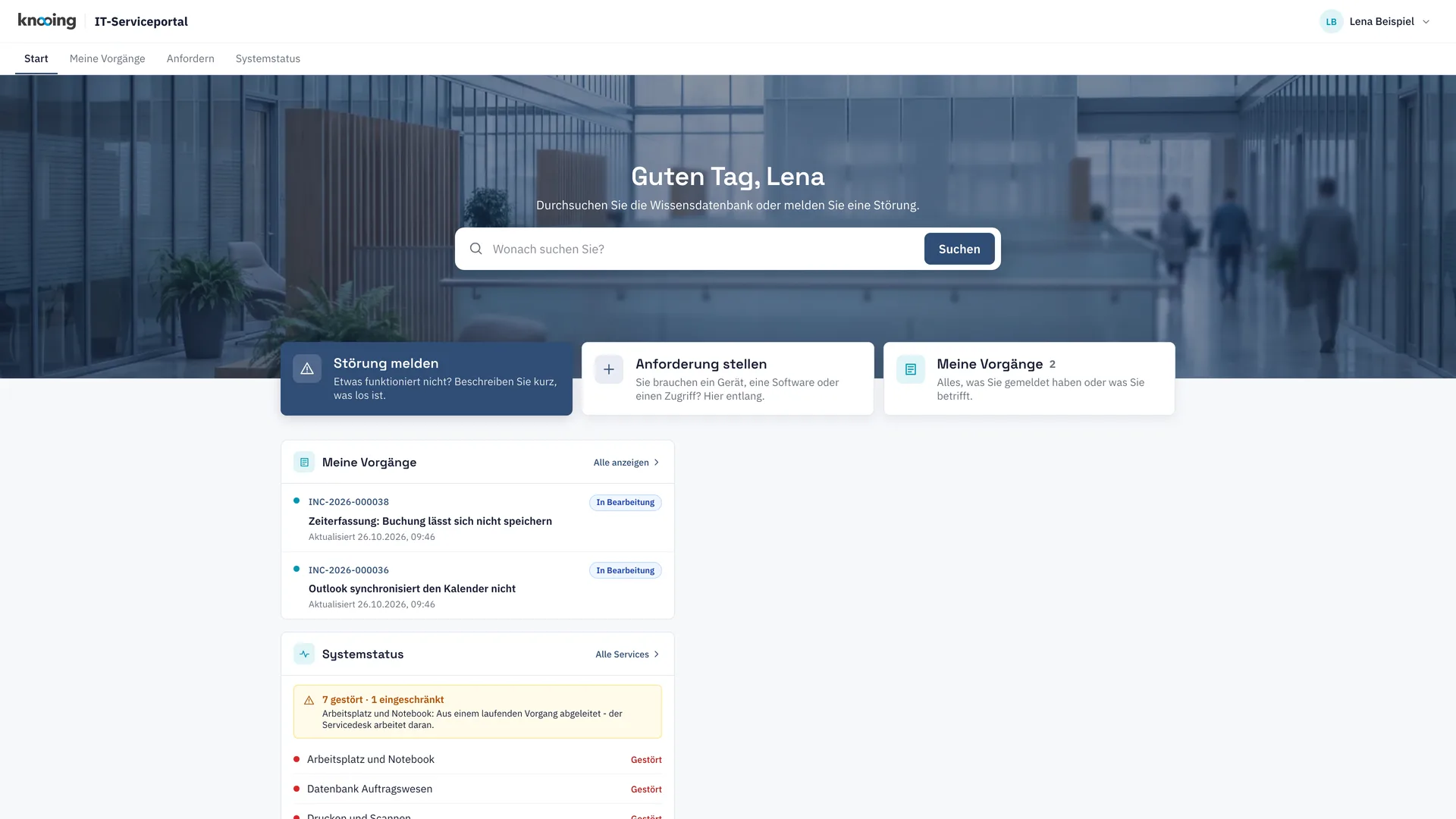
Employees report incidents, order from the catalog and track their tickets in one place. Self-help and known disruptions appear as soon as they start a report, and approvals run with deadlines and delegation.
Service catalog and portal
Self-service that takes load off your service desk.
01Employee portal
Report, order and check status in one place.
Employees report incidents, order from the catalog and track their tickets in the portal. Self-help and known disruptions appear as soon as they start a report, before the first keystroke.
- My tickets with status, deadline and notes
- My devices and my software, report an incident on the device, return software
- Share a ticket with colleagues
- System status and portal design with live preview
02Catalog and approvals
Ordering with form, approval and handover.
Every catalog item has its own order form and an approval flow with up to six stages. Open approvals send reminders and fall back to the service desk after the deadline. Before purchasing, knooing checks for free licenses or devices in stock.
- Form editor and workflow editor per catalog item
- Approval in the portal, with delegation during absence
- Handover to target systems with status, retry and confirmation
- Catalog maintenance with service owner approval and freshness checks
03Knowledge base
Knowledge with approval and expiry date.
Knowledge articles go through approval and carry versions and a validity date. knooing reminds you to review them before they expire. Released categories appear in the portal.
- Editorial flow with four-eyes approval and version chain
- Reminder before expiry, confirmation that it is still valid
- German and English version per article
- Suggest articles on the ticket and share them with the reporter
04Joiners and leavers
Joiners and leavers as bundles, satisfaction as a KPI.
A new hire triggers a bundle of software, access and device tasks, also straight from the HR system. After every closure, knooing asks about satisfaction and reports it by team and service.
- Template editor for bundles per role
- Trigger from the HR system via API
- Survey with a 1 to 5 rating via link after closure
- Reporting with distribution and low ratings, by team and service
Documentation
How it works in detail.
Documentation
Service catalog with order workflows: overview
How a catalog entry, an order form and an approval flow turn into an order that employees place in the portal and approvers decide.
4 min read
Guide
Order from the catalog in the portal
Choose a catalog entry in the employee portal, fill in the order form, submit the request and follow its status.
4 min read
Guide
Design a multi-stage approval flow in the flow editor
Create a flow with up to six approval stages, set approvers per stage, handle rejection and withdrawal, publish it and assign it to a catalog entry.
8 min read
Guide
Set approval deadlines: reminder and fallback to the service desk
Set after how many hours approvers are reminded and the service desk may also decide open catalog approvals, per tenant and per catalog entry.
4 min read
Guide
Check reuse before approval: free licenses and stock devices instead of buying new
How knooing points to free licenses and stock devices before a software or device request is approved and how approvers in the portal still approve with a reason.
4 min read
Guide
Write a knowledge article, submit it for approval and publish it
How to create a new knowledge article as a draft, set an end of validity, submit it and have a second person approve it until it is published.
7 min read
Guide
Start a joiner or leaver: trigger a bundle manually and follow it
Trigger a bundle for a joiner or leaver in the service desk, adjust items and follow progress per software, access and device.
4 min read
Documentation
Satisfaction survey: how knooing collects a rating after closure
When knooing asks for a rating after a ticket is closed, who receives it, how it is answered, what is stored and where the evaluation is.
5 min read
Make data-driven IT decisions in minutes, starting today.
Schedule a free, no-obligation demo