
01IT Service Management · SLA and escalation
Target times
that monitor themselves.
For each service, you see the customer SLA next to team OLAs and your providers' contracts. SLA clocks pause correctly, escalations trigger on their own, and the end-to-end view shows who used up the time.
SLA and escalation
One framework for customers, teams and providers.
01Framework
SLA, OLA and UC across all levels.
For each service, you see the customer SLA per priority next to team OLAs and provider underpinning contracts. knooing shows where a target time does not cover the customer SLA.
- SLA rules per priority, class and service, without overlaps
- Team OLA per priority
- UC target times per priority in the supplier contract
- Service schedule on the ticket and support level KPIs per ticket type
02Clocks and escalation
SLA clocks that pause correctly.
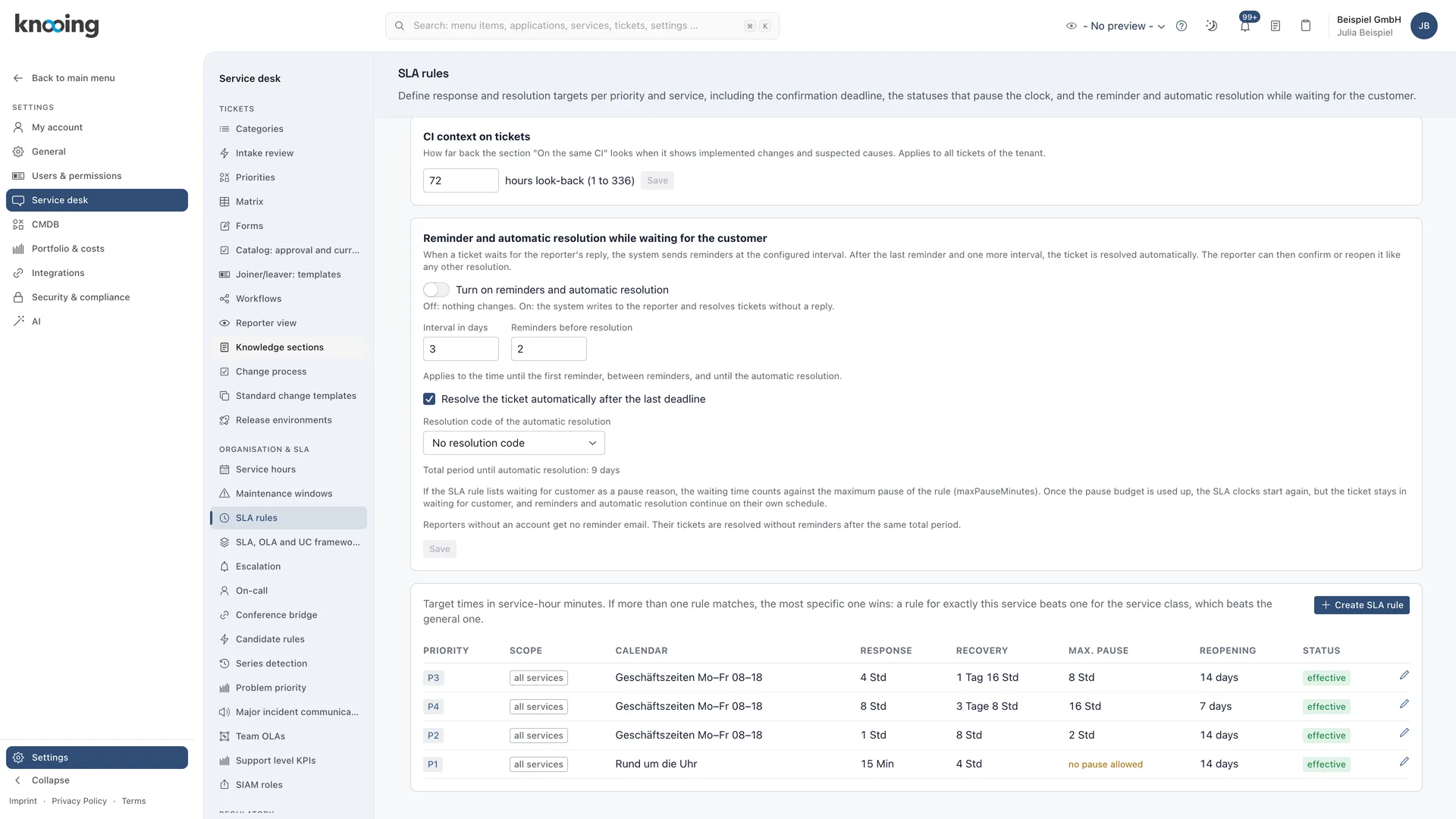
Per SLA rule, you define which statuses pause the clock. Escalation levels trigger before or after the due time and can change the team, raise the priority or create a major incident candidate.
- Pause statuses per SLA rule, reminder and auto-resolve when waiting for feedback
- Escalation levels with freely chosen thresholds and one action per level
- Timeline of the SLA clocks on the ticket
- Approved decision on which instance runs the clock
03Service hours
Service hours and availability that match.
Service hour calendars with holidays decide when clocks run. Maintenance windows do not count as downtime. Availability per service is calculated from incidents within operating hours and compared to the target.
- Service hour calendars with automatic holiday import per region
- Separate service hour calendar per provider
- Maintenance windows affect the SLA clock and availability
- Availability of all services, actual vs. target, with export
04End to end
Who used up the time?
The end-to-end view splits every customer SLA into contributions from providers, teams and customer pauses. For every breach, you see whether the provider, the team or both missed their own deadline.
- End-to-end SLA in the situation and control view
- SLA report by business service and offering, with export
- Incident KPIs on classification accuracy and duration per month
- Change KPIs with period and monthly series
Documentation
How it works in detail.
Documentation
SLA and escalation: deadlines, pauses and automatic steps at a glance
Overview of how knooing watches deadlines, when the clock stops, how it reminds and resolves automatically on open questions and what an escalation level can do: notify, raise priority, reassign the team, propose a major incident.
6 min read
Guide
Set up SLA rules: pauses, reminders and automatic resolution
How to define per SLA rule which waiting statuses stop the clock, limit pauses with a cap and switch on reminders with automatic resolution for incidents waiting for an answer.
6 min read
Guide
Set up escalation levels: thresholds, recipients and actions
How to create escalation levels with a freely chosen threshold in percent or minutes before due, define the recipients and let a level raise the priority, reassign the incident to another team or propose a major incident.
7 min read
Guide
Check the SLA, OLA and UC framework: does every level cover the customer SLA?
How to see per service the customer SLA next to the target times of the providers (UC) and the internal teams (OLA), find gaps through the findings and know where to adjust which target.
7 min read
Guide
Set a team OLA per priority: shorter internal target for urgent cases
How to add an internal target time for a team that applies to one priority only, understand which rule wins when several match, and check in the framework that the OLA covers the customer SLA.
5 min read
Guide
Create service hours, an SLA rule and a maintenance window for availability
How to create a service hours calendar, select it in an SLA rule for one service and plan a maintenance window that does not count as downtime in the availability.
7 min read
Guide
Evaluate the end-to-end SLA: who used how much time?
How to see under Overview & control how many customer SLAs were met in a period, how the time splits between providers, teams and internal work without an OLA, who co-caused a breach, and download the result as a file.
7 min read
Guide
Read the timeline of the SLA clocks on a ticket
See on the ticket, in chronological order, when deadlines were set, when clocks started, paused and resumed, and whether a deadline was met or breached.
4 min read
Make data-driven IT decisions in minutes, starting today.
Schedule a free, no-obligation demo